

What it can see
It can retrieve this project’s source metadata and available extracted passages, notes, research questions, models, journal, and the facts you set on Overview. A metadata-only entry is not readable full text. Processing or failed uploads may not yet have passages available, and retrieved excerpts may cover only part of a document. Another project’s private material stays outside this conversation. It also carries what you have told it about yourself: your “about my work” statement, your project-specific notes, your hard rules, and the patterns it has inferred from working with you, all of which is visible and editable in Tuning the Advisor. The Source basis notice beneath an answer distinguishes retrieved excerpts from saved records or analysis. An excerpt-based answer identifies how many sources supplied passages; it does not mean every section of those sources was read. A records-based answer means no new source passages were retrieved for that answer. Check the original passages before relying on a finding.Scoping a conversation
By default it works across the whole project, and the scope bar above the input narrows that, so if you pick specific sources, questions, notes or models the conversation becomes about those. Reach for it when the whole-project answer comes back too diffuse, as in “compare these three papers” or “do these five sources support this question?”. The bar shows what is in scope and Clear scope puts you back to the whole project. Source, note, and model analysis respects your selection. Project facts, journal history, advisor memory, themes, and venue-fit context remain project-wide background; they are not evidence about only the selected sources.Check-ins
Come back after time away and it opens with a check-in instead of a blank box. The first check-in invites you to explore the sources, notes, and questions available in the project. It does not claim a full reading has already happened. Later check-ins show when you were last here and counts of new sources, notes, questions, models and journal entries, with suggested conversation openers. When nothing has changed it says so, with “The project is where you left it.”, rather than manufacturing urgency.Observations, proposals, and saved blocks
Three kinds of thing come out of a conversation, and they behave differently. The written response is the answer. Tables, charts, evidence, and reference blocks appear when they help, not on every turn. You can ask for a brief answer, discuss a concern, or request one practical next step without getting a dashboard. Observations are what it notices. Use Save to Journal below a written answer, or Save on an observation card, to keep it in your Journal and in Saved observations under Project context. The control changes to Saved after the save succeeds and stays saved when you reopen the conversation. Saving the same answer again does not create another Journal entry. Proposals are actions it suggests, such as a journal entry, a note or a milestone. Each is labelled Proposed action and nothing happens until you press Approve, though you can edit a proposal first or dismiss it. It will not propose something you have not discussed or clearly implied, and proposed entries record observations and decisions rather than drafted prose you would pass off as your own. Saved blocks keep individual tables, charts, evidence, and other response blocks for later. Choose Save block, name it in the dialog, and find it under Saved blocks in Project context. This saves the block separately from saving the written answer to the Journal. Project context holds saved observations and blocks, What I’m seeing when standing insights are available, and shortcuts to Preferences and Adjust guidance. It is a collection of saved project material, not a list of sources used for the current answer. Discuss brings a saved observation into the conversation; Open original conversation returns to the session for an answer you saved yourself. On smaller screens, the Project context button opens a drawer. History opens a separate drawer for conversations. Close the drawer to return to your message. If a context section cannot load, it shows an error and Retry; that error does not mean your saved work was removed.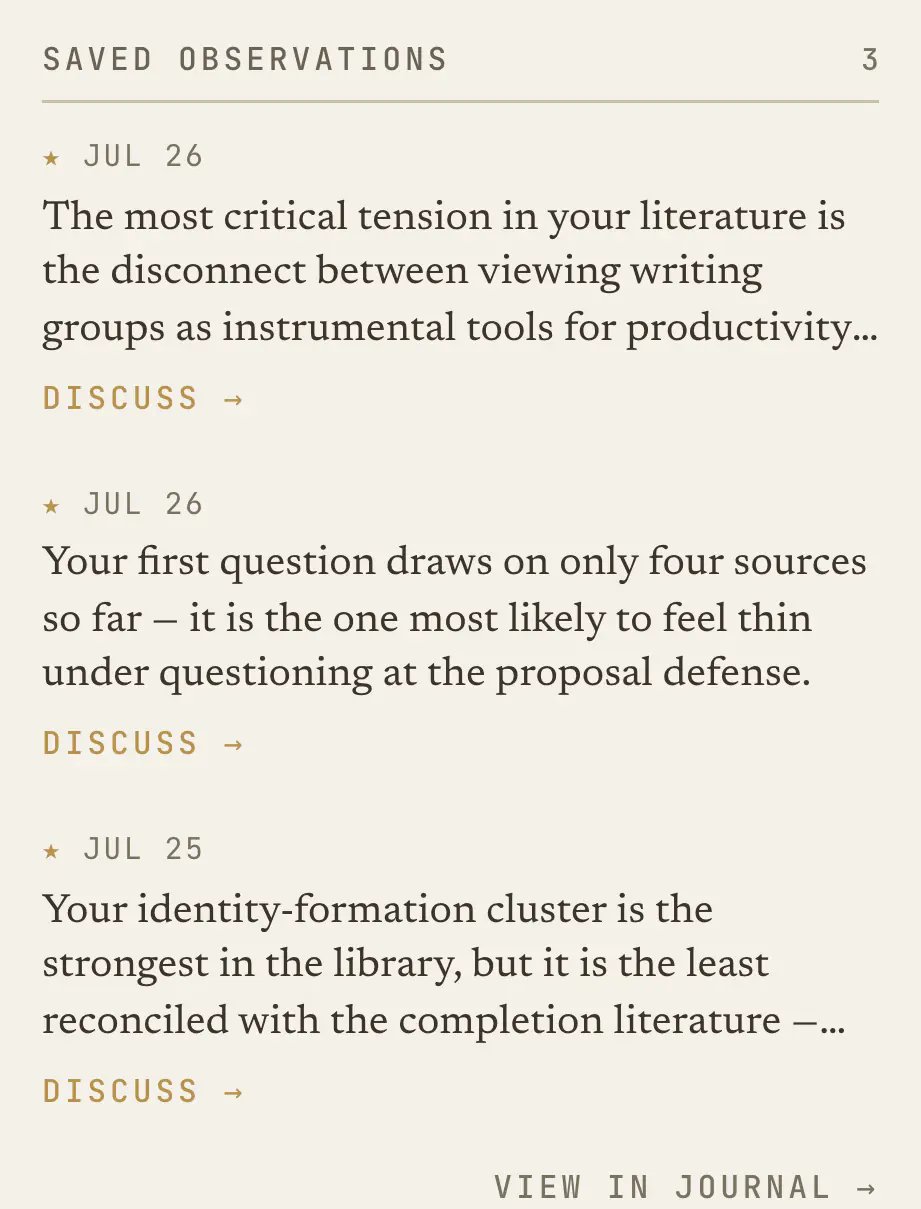
Sessions
Conversations are kept, so New starts a fresh one while History lists the old ones and searches them. A session is the natural unit, being one sitting and one line of thought, and re-opening a session from three weeks ago is often the fastest way to remember what you concluded. You can rate any response Helpful or Off the mark, which feeds the calibration described in Tuning the Advisor.If an answer stops or times out
An unfinished answer is marked in the conversation. Any text or blocks already shown are partial results. When the latest answer is unfinished, Retry this question resends the question with its original source, question, note, and model selections, even if you changed the scope afterward. If the request keeps failing, contact support with the visible error and the approximate time. For missing source text, check Source processing and limits.What it will not do
These are the advisor’s intended boundaries, regardless of your settings. AI can still make mistakes: check consequential interpretations against the source material.- It will not draft chapters, sections, abstracts, or extended prose for you to submit as your own. Ask it to help you phrase your sentence and it will, but it will not produce the writing you have to defend.
- It must ground references. Library citation blocks use stored bibliographic fields. References transcribed from an imported paper’s bibliography are labeled unverified; their presence there does not independently verify the publication. Evidence-block quotations are checked against passages retrieved for that answer.
- It will not assert conclusions your data cannot support. It separates what your sources show from what they do not.
- It will not flatter you, congratulate you, or compare you to anyone else. No “great question”, because praise is noise and how you compare to other researchers is nobody’s business.
- It will not act without you. Proposals wait for approval.