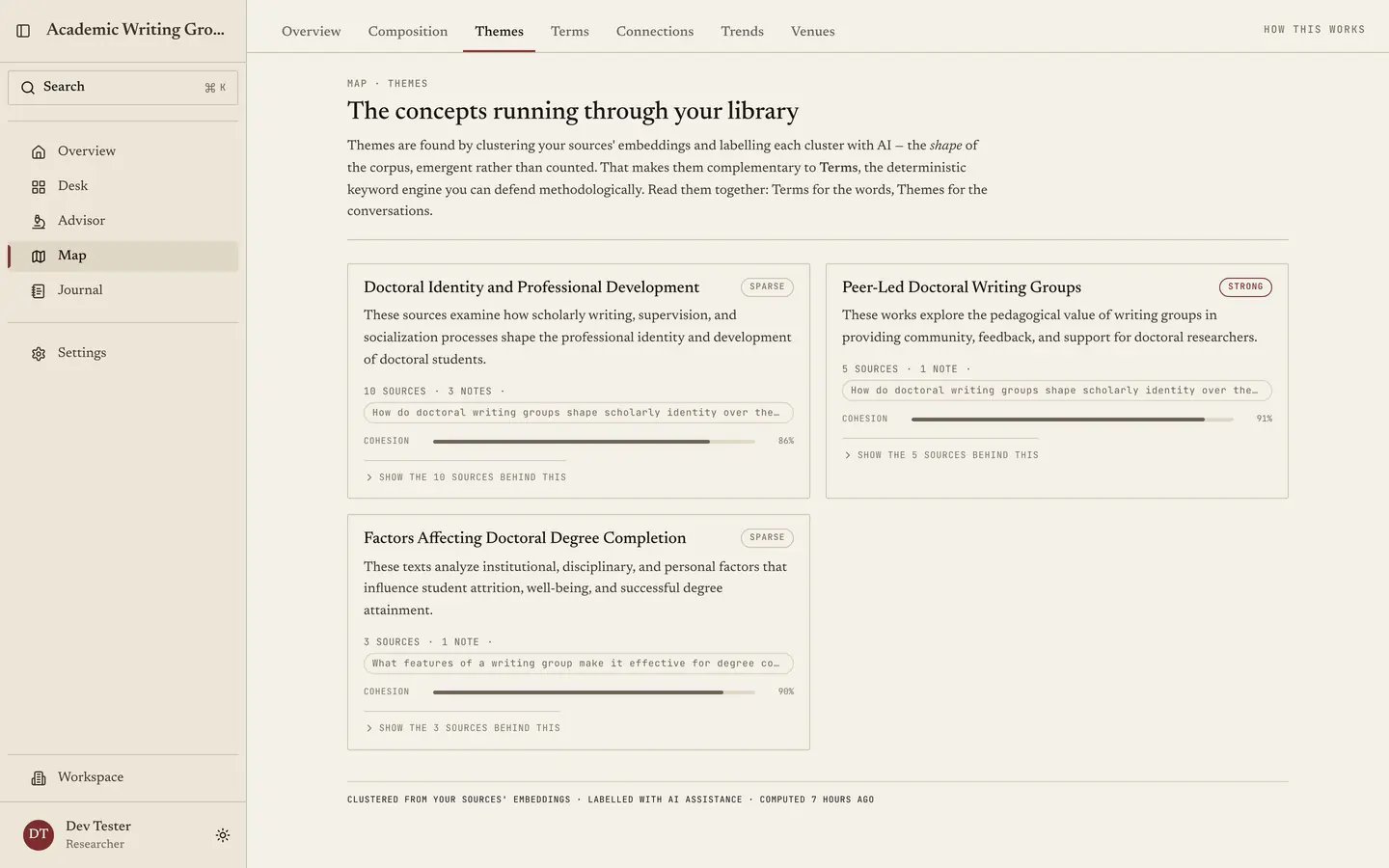
Themes gives you two ways to describe the concepts running through your library. Your themes are interpretations that you and your collaborators define from selected sources. Found in your library contains clusters Quester finds from source embeddings and labels with AI. Authored themes are available on every plan. Generated clustering needs a paid plan. Both live on the same page because they answer the same broad question, but their provenance always stays visible: Quester does not present a researcher-authored grouping as something the model discovered. Treat Themes as the complement to Terms. Terms gives you counts you can defend line by line, whereas Themes helps you interpret how the corpus is structured.

The two sections

Your themes

Project-shared interpretations created by you or another project member. An authored theme has a title, an optional description and at least one source. The same source may belong to several authored themes when ideas cut across the corpus. Authored cards say Authored, or Curated from generated when they began as a generated cluster. They show source and note counts, but no strength or cluster-quality score: those measurements belong to embedding clusters and would be misleading on a grouping a researcher chose.

Found in your library

Generated clusters based on the meaning of your source text rather than exact keyword matches. Each card shows its sources, note coverage, relative strength and cluster quality. A generated label is a short interpretation of the grouping, not the evidence that created it. The clustering carries the weight here. What the analysis knows is that a set of sources sits together in embedding space; the title and description are its best concise account of why. Correcting that language does not alter the generated cluster.

Create an authored theme

  1. Open Map → Themes and select Create theme under Your themes.
  2. Add a title and, if useful, a description of the interpretation.
  3. Select at least one source from the project.
  4. Select Create theme.
The theme appears for everyone in the project. Any project member can edit it later. Sources do not become exclusive to that theme, so you can use one paper in several cross-cutting interpretations.

Edit an authored theme

Select the pencil on an authored card to change its title, description or sources. A theme must retain at least one source. Because themes are shared, Quester protects against silently overwriting a collaborator’s newer edit. If the theme changed after you loaded it, the save is rejected and you should reload before applying your edit again. If a source is deleted from the project, Quester removes it from every authored theme that used it. A theme left with no sources is archived rather than kept as an empty claim.

Curate a generated theme

A generated snapshot remains immutable. Your actions are stored as project-level curation layered over it.
  • Correct its wording. Select the pencil and change only the title or description. The card becomes Researcher-edited. Use Reset generated label to return to the original wording.
  • Change its membership. Add or remove sources in the editor. Saving creates a new authored theme marked Curated from generated and hides the generated original. This keeps your judgment distinct from the cluster Quester found.
  • Hide an unhelpful cluster. Select Hide generated theme. The cluster moves to Hidden generated themes, where any project member can restore it.
These actions are shared across the project rather than personal display preferences. Quester does not merge or split generated clusters manually in this version; changing their membership is the path to an authored theme.

Delete and restore

Select the trash icon on an authored card to delete it. Quester asks for confirmation and then shows an immediate Undo action. Deletion is soft, so Undo restores the same shared theme instead of creating a replacement. Generated themes are hidden, not deleted. Expand Hidden generated themes and select Restore to show one again.

How to read generated themes

Ask three questions, in this order. Do the strong themes match what you think your project is about? A top theme you consider background means either your reading has drifted or your framing has. Is there a theme you did not expect? An unnamed cluster running through many papers is often a chapter and occasionally a contribution. Is anything missing? A construct central to your questions with no generated cluster behind it may mean you have not gathered enough literature for it. You can also create an authored theme when the idea is present but the clustering does not express your interpretation.

What a theme is not

Not a claim about your field. A theme describes this project’s library. If you collect thirty papers on one subject, that subject becomes prominent here whether or not it is prominent in the discipline. Not a topic taxonomy. Generated themes emerge from what you have, while authored themes express your own synthesis. Neither is a standard subject classification. Not stable at small sizes. This applies to generated clustering, not to an authored theme you deliberately maintain. A cluster over twelve sources reflects those twelve sources; generated analysis becomes more useful as the corpus grows. Not a citable statistic. If you need a count for your methodology, go to Terms. Themes is for seeing and asserting structure rather than for citing a field-level result.

Freshness and plan access

Generated results are cached against the shape of your corpus and refresh when it changes. While a refresh runs, Quester may show the previous clustering instead of leaving the page blank. Authored themes do not wait for clustering and remain available on every plan. On a plan without AI access, Your themes remains fully usable while Found in your library shows its plan gate. If AI is turned off for the project, Quester does not compute new generated themes; previously generated results may remain visible as prior analysis.

Where themes appear elsewhere

Visible authored and generated themes contribute to the theme summary on Map: Overview and can ground the Advisor. Hidden generated themes are suppressed from those surfaces. Trends follows generated clusters across saved computations. Authored themes do not appear in theme movement because they are maintained by collaborators rather than recomputed from the corpus. Project exports include authored themes, generated-label edits and generated-theme hides so the curation record can be recovered with the rest of the research data. Next: Terms.
Last modified on August 30, 2026