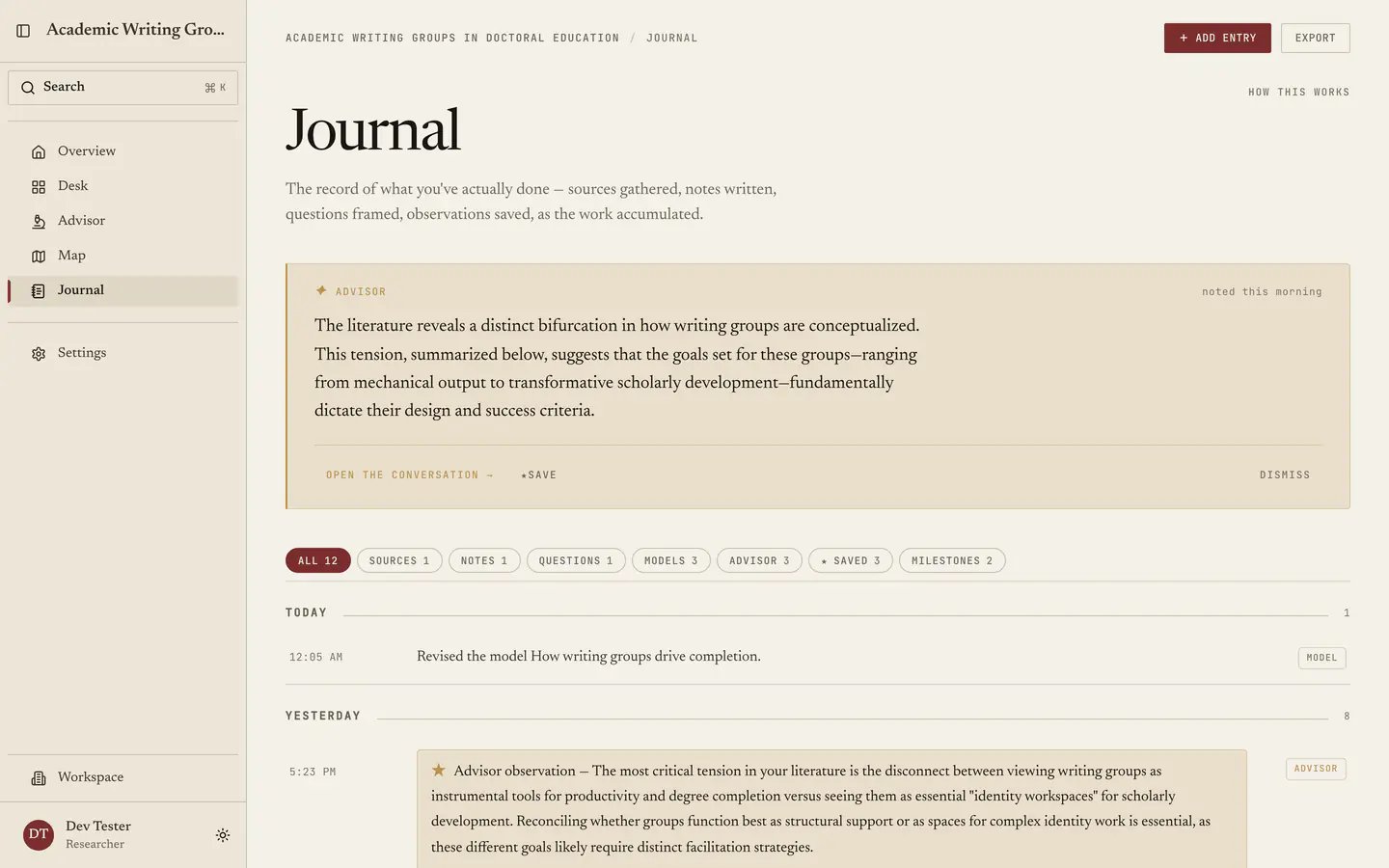
The Journal records what you did in the order you did it. Every source you added, note you wrote, question you framed, model you built and analysis you ran appears here on its own, grouped by day with the newest first, next to the milestones and meetings you log by hand and the advisor observations you chose to keep. Each entry also links to what the work produced, so the record is a way back into it: the entry naming a question opens that question, and a day that added four sources opens each of them. There is no XP, no levels, no trophies and no streaks, because those count activity and nobody finishes a dissertation by being active. This counts accumulation, which is what matters across five years and what you will need on the day someone asks what you were doing in March. The journal: a day-grouped timeline with filter pills across the top and a starred advisor observation in gold.

What lands here without you doing anything

Most of the record writes itself:
  • Sources added to the library, singly or in bulk: “Added 12 sources to the library.”
  • Notes written.
  • Questions framed.
  • Models built and revised.
  • Analyses run.
  • Status and design changes: “Moved the project to Analysis.”
  • Project creation, the seed entry every project starts with.
None of that needs logging, since doing the work in Quester puts it in the record.

Getting back to the thing itself

Every automatic entry carries links to what it produced. An entry about one thing shows it straight away, so “Framed the question: How does peer feedback change revision?” sits above a link to that question. An entry covering several, such as “Added 4 sources to the library,” keeps them behind a Show 4 control. It expands to one link per source, so a productive day stays one line per action until you ask for the detail. This is what makes the Journal usable as a way in rather than only a way of looking back: reading March and wanting the source you added on the 14th takes one click from the entry that mentions it. Sources and notes can be deleted outright, and a link to something deleted is shown struck through and does not go anywhere, rather than sending you to a page that no longer exists.

What you log by hand

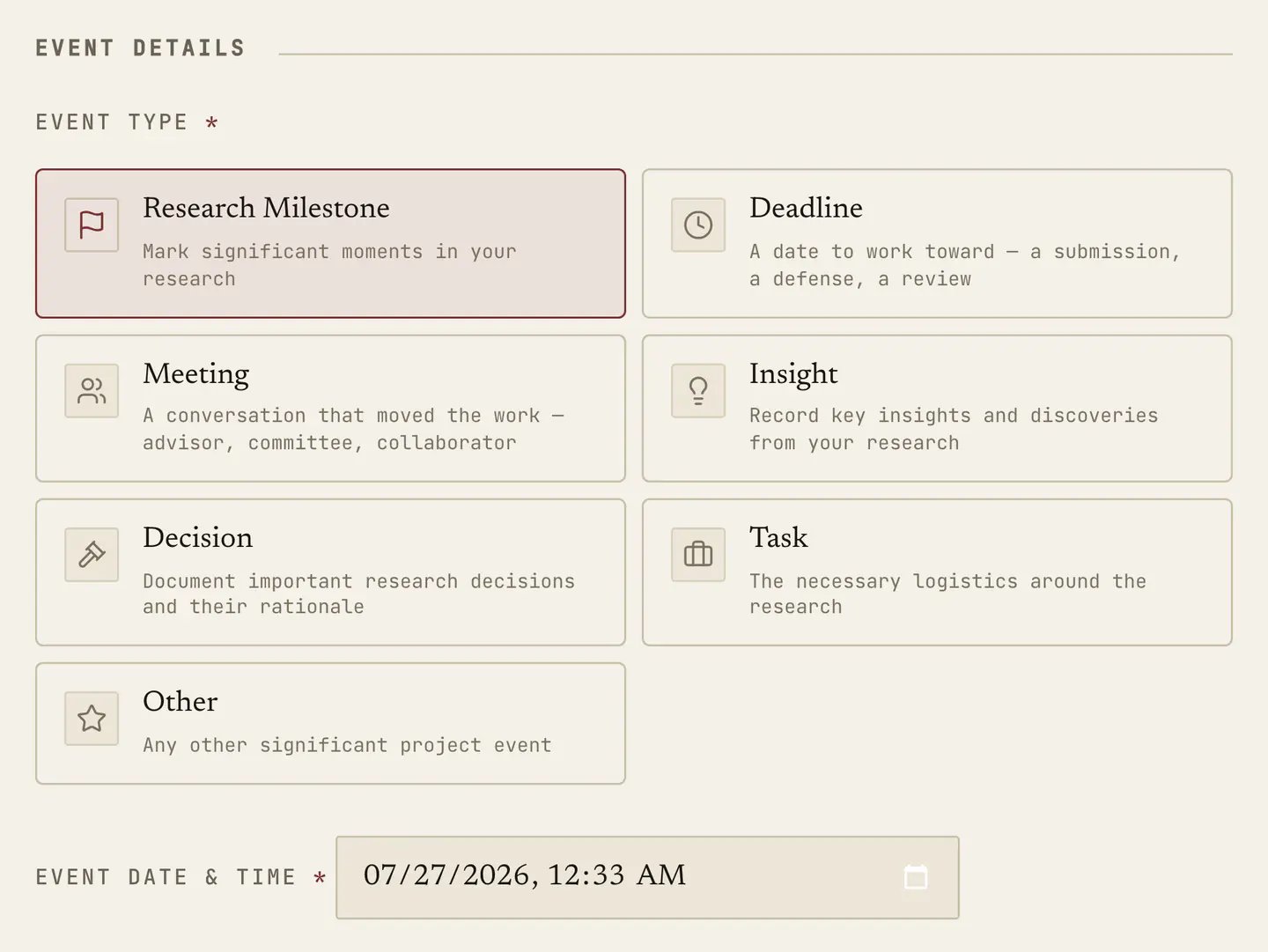
Three kinds of entry the system has no way of knowing about, which you add with Add entry. The New entry dialog's type grid: research milestone, deadline, meeting, insight, decision, task and other. Milestones are the real turns, such as passing candidacy, a committee approving the proposal, or finishing data collection, and they carry an oxblood label because these are what you scan for later. Meetings cover supervisions, committee meetings and defences, recording what was said and what you agreed to, and this is the one people regret not keeping. Deadlines, decisions, insights and admin fill in the rest when you need them, and a decision written down on the day you made it beats one reconstructed a year later by a wide margin. An entry’s title can contain up to 200 characters and its description up to 20,000 characters.
Saved advisor observations

Observations saved from Overview and written answers kept with Save to Journal in a conversation arrive here in gold, captioned “Saved advisor observation”. Saving the same answer again does not add a duplicate entry. A saved observation keeps any attached links to sources or questions. Conversation saves also retain their origin: in the Advisor’s Project context, Open original conversation returns to the session for an answer you saved yourself. Save block in the Advisor keeps an individual response block under Saved blocks in Project context. It does not create a saved observation in the Journal. Starring is how a good remark becomes part of the record, and an observation you agreed with in month nine documents how your own thinking developed, which is close to impossible to reconstruct after the fact. Star generously.

Filtering and moving around

Filter pills run across the top: All, Sources, Notes, Questions, Models, Advisor, Saved, Milestones. Learn Saved, which shows only the starred observations and amounts to the shortest useful summary of a project’s intellectual history, and Milestones, which puts the skeleton of the whole degree on one screen. Jump to month gets you through a long record without scrolling, while days show as Today and Yesterday where that reads better than a date. An empty filter says “Nothing in this view yet.” instead of pretending.

Export

Export takes the current view, active filter and all, and gives you Markdown headed with the project name, the filter and the date. Some concrete uses: the Milestones filter is most of a progress report already, the Saved filter is a defensible account of how your thinking moved, and the whole record exported at the end of a year gives you the raw material for an annual review. Because it is Markdown, it pastes into anything.

Journal or Lately?

Overview carries a Lately stream showing the last handful of events for orientation, whereas the Journal is the archive, holding everything, filterable, jumpable and exportable. Check Lately to see what you were just doing, and come here to answer a question about the past.

What it is really for

Two things, the first of them administrative. Annual reviews, progress reports and supervision meetings all ask you to account for your time, and six months reconstructed from memory is both worse and less truthful than six months read off a record. The second matters more. A long research project feels static from the inside, for months at a stretch, and that feeling is usually wrong and is one of the main reasons people quit. A record showing forty sources read, twelve notes written and four questions sharpened over a term is not encouragement but evidence, which works better. Next: The Map.
Last modified on September 6, 2026